
Ecommerce Statistics
Get Insights on Customers, Revenue, and Buying Habits
- What It's All About
- Set the Date
- Filters For eCommerce Statistics
- Integrate E-Commerce Events to Boost Your Website Intelligence
- Event "add_payment_info"
- Event "add_shipping_info"
- Event "add_to_cart"
- Event "add_to_wishlist"
- Event "begin_checkout"
- Event "generate_lead"
- Event "login"
- Event "purchase"
- Event "refund"
- Event "remove_from_cart"
- Event "remove_from_wishlist"
- Event "share"
- Event "sign_up"
- Event "view_cart"
- Event "view_item"
- Event "view_item_list"
What It's All About
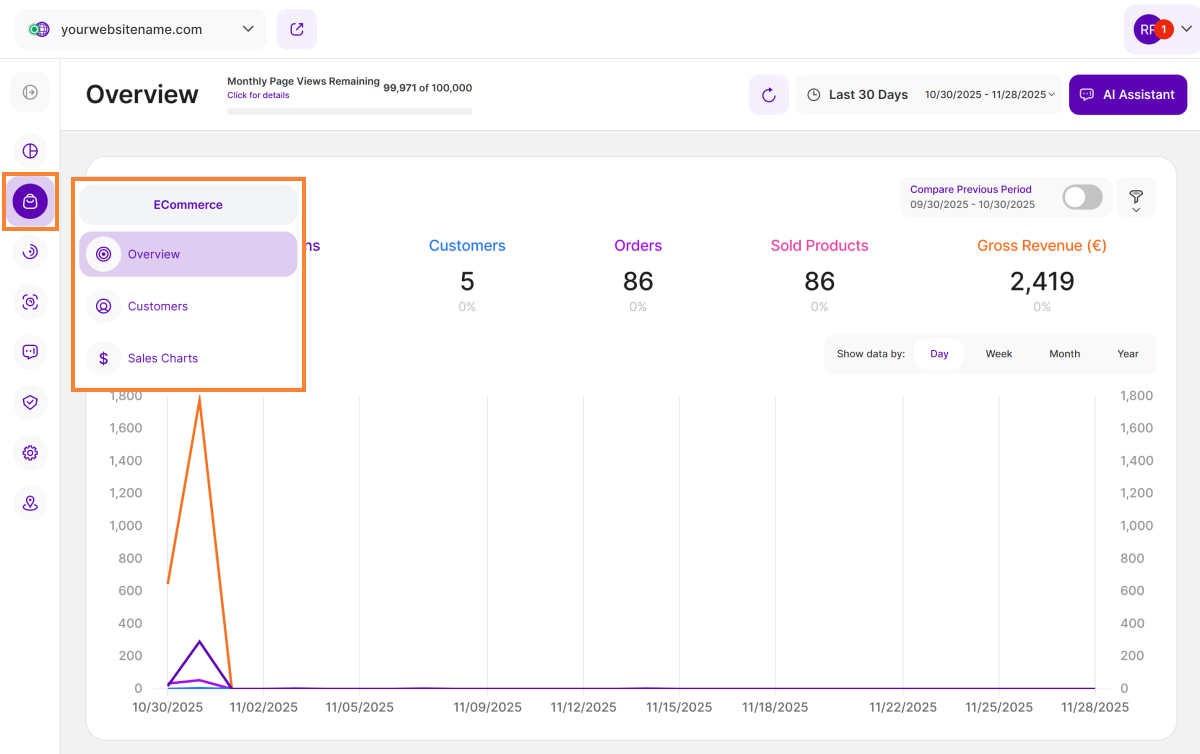
E-commerce Statistics is a crucial feature designed to directly guide the growth and success of your online retail store. Leverage this data to gain granular, actionable insight into customer and prospect behavior, evaluate the popularity of specific products, and understand wider purchasing trends to boost your revenue.
It consists of three submodules:
- Overview
- Customers
- Sales Charts
Set the Date
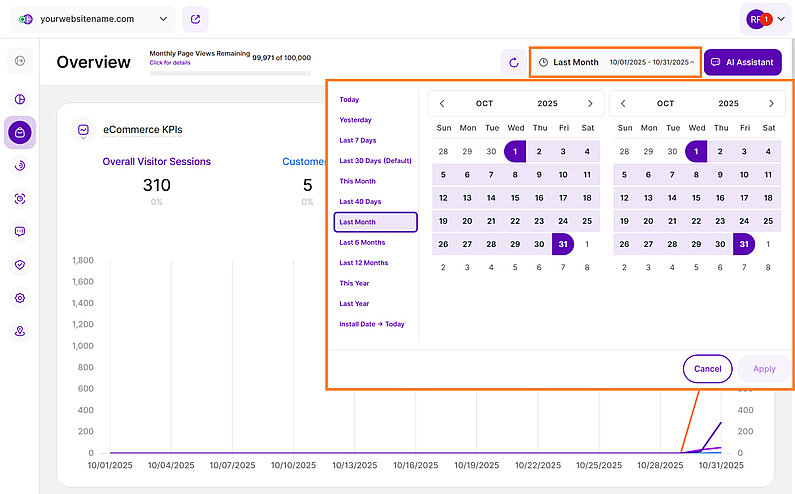
The date picker, located directly above the dashboard tiles, allows you to adjust your data view to any specific time period or single day.
It is crucial to use this feature to isolate data corresponding to specific marketing campaigns or implementation periods. This focused view enables you to accurately assess the effectiveness of your actions and gain actionable insights essential for future strategic planning.
Important Note: The app retains your previously set filters and date intervals across navigation and logins. However, closing the tab or session expiration will cause the system to automatically revert to the default setting of "Last 30 Days."
Filters For eCommerce Statistics
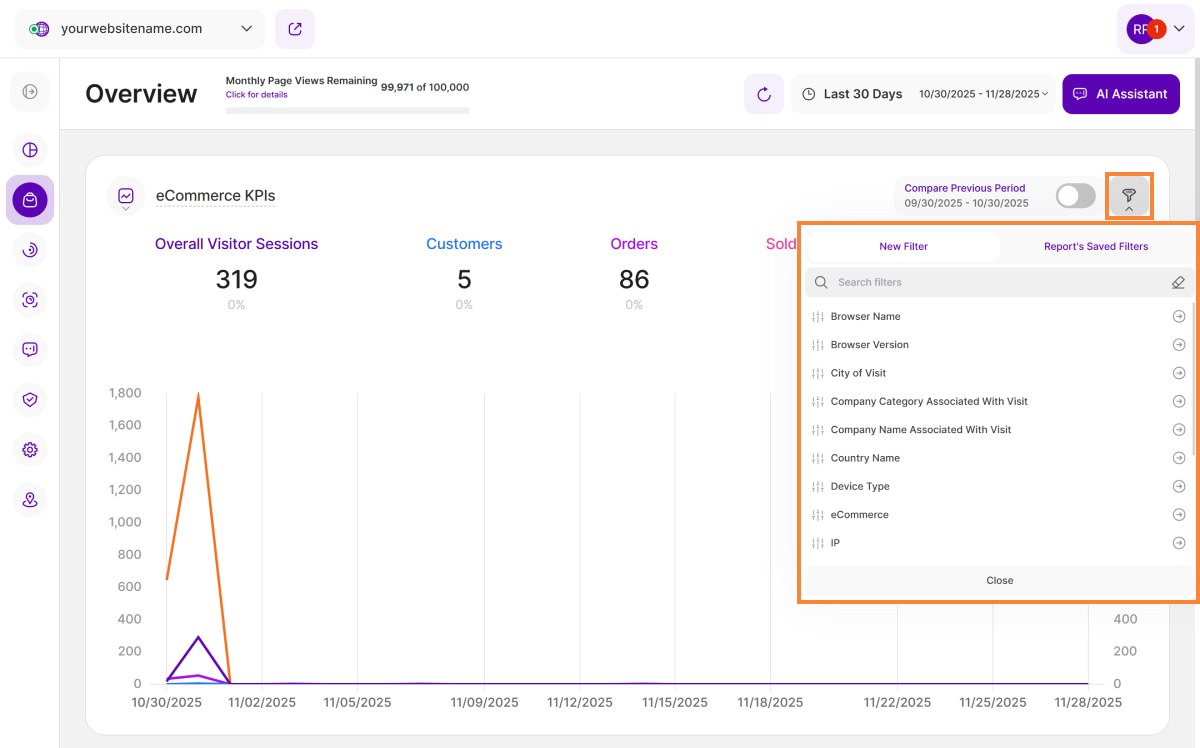
Take control of your eCommerce statistics with our new filters! Dive deeper than ever before into your order, customer, and product data to uncover valuable patterns and sharply refine your sales strategy.
The complete list of available filters is as follows:
| Filter Category | What It Filters and Why |
| Browser Name | Allows you to filter the data by browser name which helps you optimize your website based on your audience preferences. |
| Browser Version | Same with the Browser Name, you can ensure that your website is optimized for the browsers your audience prefers. Identify issues related to specific browser versions and prioritize fixes accordingly. |
| City of Visit | Drill down into visitor location data even further by using this filter. This information can be pivotal for local businesses, helping them tailor their content and marketing strategies to specific cities. |
| Company Category Associated With Visit | B2B businesses can derive significant value from this filter. Identify which companies are visiting your site and segment them by industry category. This can inform lead generation strategies and personalized outreach efforts. |
| Company Name Associated With Visit | Same with the Company Category, this filter would help in analyzing the data by industry category, getting to know which companies from specific industries visit your website the most. This filter allows you to segment and organize your visitor data to gain insights into the types of companies and industries showing interest in your website. |
| Country Name | Businesses with a global presence will appreciate the Country Name filter. It enables you to explore visitor behavior and preferences on a country-specific level, aiding in localization efforts and targeting strategies. |
| Device Type | Understand how your audience accesses your website by filtering data based on device type. This filter helps ensure that your site is responsive and visitor-friendly across various devices, from desktops to smartphones. |
| eCommerce | Filters based on order details to help you analyze your orders, including customer and product details. |
| IP | The IP filter can be a valuable tool for tracking visits from specific IP addresses, such as those from your organization or potential clients. Monitor visitor activity and tailor your website experience accordingly. |
| Operating System | Filters the OS used (e.g., Windows, iOS, Android). Critical for testing, as certain bugs or features often only appear on specific OS versions and device types. |
| Page URL | Filters the specific pages viewed on your site. Highlights the exact pages where customers are getting confused or leaving (drop-off points), enabling targeted efforts to fix friction and boost conversions. |
| Referrer URL | Filters the source URL that directed the visitor to your site. Helps measure which external sites successfully refer high-quality traffic on specific devices. |
| Screen Resolution | Filters the height and width of the visitor's screen in pixels. Crucial for identifying if layout breaks or poor UX are tied to specific, non-standard screen sizes across devices. |
| Traffic Channel | Filters the marketing group the traffic belongs to (e.g., Organic Search, Social Media, AI Traffic). This insight can help you allocate resources more effectively and refine your marketing strategies. |
| UTM Campaign Filter | Filters visits based on the specific UTM parameter used in a campaign link. Now, you can easily filter your dashboard data by specific UTM campaigns to see exactly how each campaign is performing. |
How to Filter Data
- Apply a Filter: Click the filter icon, choose your filter, specify criteria, and click Submit.
- Save a Template: Click Save set filters for report block, name the template, and click Save Changes.
- Use a Template: Click the filter icon, go to the Report’s Saved Filters tab, select the template, and click Submit.
- Manage Templates: Click the pencil icon next to the template to rename it or select Delete Template (confirmation required).
Unleash the Power of Your eCommerce Data
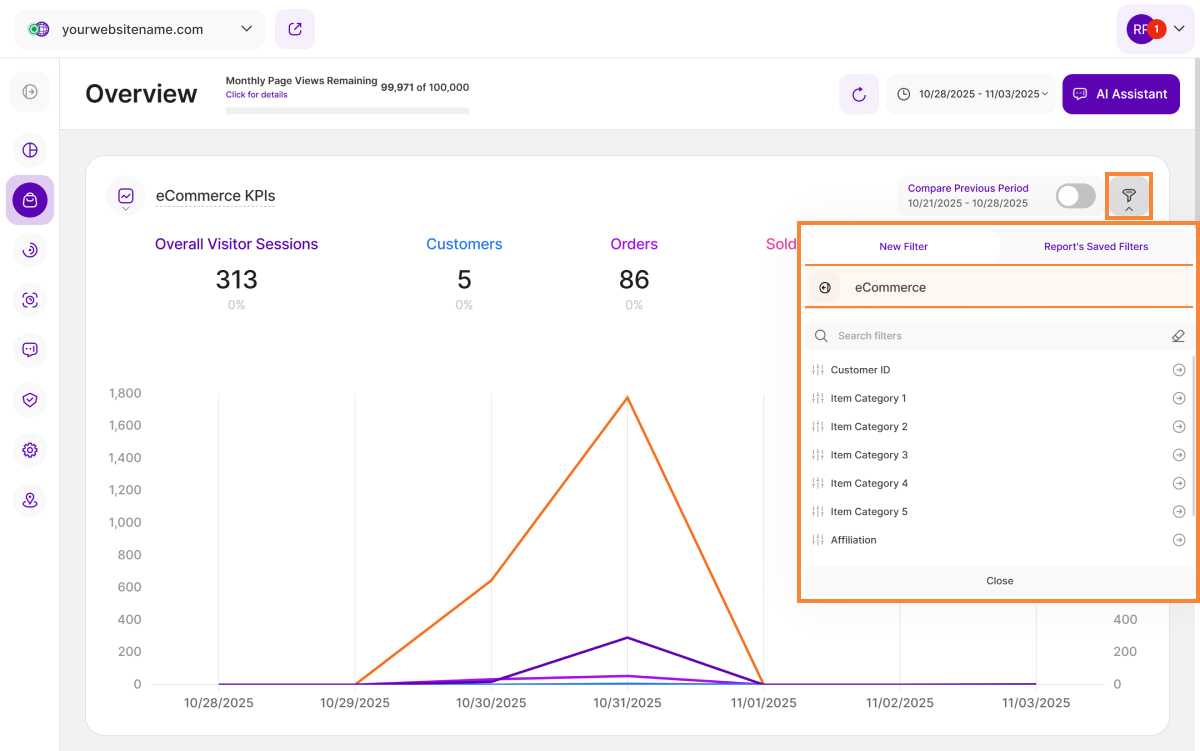
The eCommerce filter is a powerful analytical tool designed to help you dive deep into your sales data and drive strategic growth. By leveraging this feature, you can gain valuable insights into customer behavior, product performance, and overall sales trends.
To precisely segment your data for deeper analysis, utilize the following filter options:
- Customer Details: Customer ID
- Product Categories: Item Category 1, Item Category 2, Item Category 3, Item Category 4, Item Category 5
- Product Details: Item ID, Item Name
- Source: Affiliation
You can find and use the eCommerce filter in the following report blocks to analyze your KPIs:
- eCommerce KPIs
- Revenue by Product
- Units Sold per Product
- Product KPIs
- Ratio Sessions/Sales
- Number of Orders by Traffic Channel
Important Hint: Combine multiple filters to narrow down your analysis and get more specific results.
Integrate E-Commerce Events to Boost Your Website Intelligence
The E-commerce Events function is very similarly to the custom events feature. It relies on the global va function available in the website of the user that sends the events through the worker to the API.
The function expects 3 parameters
- ecom - to specify that this is an e-com event
- The type of the events from the list below
- The payload of the event
The events follow a very similar structure to Google Analytics in order to facilitate migration.
Event "add_payment_info"
Description of the "add_payment_info" event
This event is triggered when a user submits their payment information during an ecommerce checkout process. This information typically includes the user’s credit card number, billing address, and other relevant details. By tracking this event, you will gain insights into the number of successful transactions and the effectiveness of your payment processing system.
Event Tag for "add_payment_info"
va('ecom', 'add_payment_info', {
  "customer": {
    "id": "internalID",
    "name": "John Smith",
    "email": "john@smith.com",
    "phoneNumber": "+4012312312312"
  },
  "currency": "RON",
  "value": 0.00,
  "method": "Credit Card"
})
Parameters for "add_payment_info"
| Name | Type | Required | Example Value | Description |
|---|---|---|---|---|
currency | string | Yes* | EUR | Currency of the items associated with the event, in 3-letter ISO 4217 format. |
value | number | Yes* | 17.99 | The monetary value of the event. |
payment_type | string | No | Credit Card | The chosen method of payment |
Event "add_shipping_info"
Description of the "add_shipping_info" event
This event is triggered when a user submits their shipping information during an ecommerce checkout process. Shipping information typically includes the user’s name, address, and other relevant details that are required to deliver the purchased product to them. By tracking this event, you will gain insights into the number of successful deliveries and the effectiveness of your shipping process. This can help you to optimize your shipping strategies and improve overall customer satisfaction.
Event tag for "add_shipping_info"
va('ecom','add_shipping_info',{
  "customer": {
    "id": "internalID",
    "name": "John Smith",
    "email": "john@smith.com",
    "phoneNumber": "+4012312312312"
  },
  "currency":"RON",
  "value":0.00,
  "shippingTier":"DHL"
})
Parameters for "add_shipping_info"
| Name | Type | Required | Example Value | Description |
|---|---|---|---|---|
currency | string | Yes* | EUR | Currency of the items associated with the event, in 3-letter ISO 4217 format. |
value | number | Yes* | 17.99 | The monetary value of the event (quantity * price) |
shipping_tier | string | No | Ground | The shipping tier (e.g. Ground, Air, Next-day) selected for delivery of the purchased item. |
Event "add_to_cart"
Description of the "add_to_cart" event
This event is triggered when a user adds an item to their cart during an ecommerce session. By tracking this event, you will gain insights into the number of items added to the cart and the effectiveness of your product placement and pricing strategies. This can help you optimize your ecommerce experience and improve customer satisfaction.
Event tag for "add_to_cart"
va('ecom','add_to_cart',{
  "customer": {
    "id": "internalID",
    "name": "John Smith",
    "email": "john@smith.com",
    "phoneNumber": "+4012312312312"
  },
  "currency":"RON",
  "value":0.00,
  "items":[
    {
      "id": "SKU_123",
      "item_name": "iPhone 15",
      "affiliation": "Magazin online #1",
      "coupon": "50%OFF",
      "discount": 10,
      "index": 0,
      "item_brand": "Apple",
      "item_category": "Category 1",
      "item_category2": "Category 2",
      "item_category3": "Category 3",
      "item_category4": "Category 4",
      "item_category5": "Category 5",
      "item_list_id": "LIST-123",
      "item_list_name": "John's wishlist",
      "item_variant": "Sky Blue",
      "location_id": "Online shop #2",
      "price": 6512.30,
      "quantity": 1,
      "image_url": "https://www.apple.com/newsroom/images/2023/09/apple-unveils-iphone-15-pro-and-iphone-15-pro-max/tile/Apple-iPhone-15-Pro-lineup-hero-230912.jpg.og.jpg?202309270316"
    }
  ]
})
Parameters for "add_to_cart"
| Name | Type | Required | Example Value | Description |
|---|---|---|---|---|
currency | string | Yes* | EUR | Currency of the items associated with the event, in 3-letter ISO 4217 format. |
value | number | Yes* | 17.99 | The monetary value of the event. |
items | Array<Item> | Yes | | The items of the event. |
Item parameters for "add_to_cart"
| Name | Type | Required | Example Value | Description |
|---|---|---|---|---|
item_id | string | Yes* | SKU_123 | The ID of the item. |
item_name | string | Yes* | iPhone 15 | The name of the item. |
affiliation | string | No | Magazin online #1 | A product affiliation to designate a supplying company or brick and mortar store location. Note: 'affiliation' is only available at the item-scope. |
coupon | string | No | 50%OFF | The coupon name/code associated with the item. Event-level and item-level coupon parameters are independent. |
discount | number | No | 10 | The unit monetary discount value associated with the item. |
index | number | No | 0 | The index/position of the item in a list. |
item_brand | string | No | Apple | The brand of the item. |
item_category | string | No | Category 1 | The category of the item. If used as part of a category hierarchy or taxonomy then this will be the first category. |
item_category2 | string | No | Category 2 | The second category hierarchy or additional taxonomy for the item. |
item_category3 | string | No | Category 3 | The third category hierarchy or additional taxonomy for the item. |
item_category4 | string | No | Category 4 | The fourth category hierarchy or additional taxonomy for the item. |
item_category5 | string | No | Category 5 | The fifth category hierarchy or additional taxonomy for the item. |
item_list_id | string | No | LIST-123 | The ID of the list in which the item was presented to the user. If set, event-level item_list_name is ignored. If not set, event-level item_list_name is used, if present. |
item_list_name | string | No | John's wishlist | The name of the list in which the item was presented to the user. If set, event-level item_list_name is ignored. If not set, event-level item_list_name is used, if present. |
item_variant | string | No | Sky Blue | The item variant or unique code or description for additional item details/options. |
location_id | string | No | Online shop #2 | The location associated with the item (e.g. the physical store location). |
price | number | No | 6512.30 | The monetary unit price of the item, in units of the specified currency parameter. If a discount applies to the item, set price to the discounted unit price and specify the unit price discount in the discount parameter. |
quantity | number | No | 1 | Item quantity. |
image_url | string | No | imageURLoftheproduct.com | The image URL of the product. |
Event "add_to_wishlist"
Description of the "add_to_wishlist" event
This event indicates that a user has added an item to their wishlist. You can leverage this event to identify popular gift items in your app.
Event tag for "add_to_wishlist"
va('ecom','add_to_wishlist',{
  "customer": {
    "id": "internalID",
    "name": "John Smith",
    "email": "john@smith.com",
    "phoneNumber": "+4012312312312"
  },
  "currency":"RON",
  "value":0.00,
  "items":[
    {
      "id": "SKU_123",
      "item_name": "iPhone 15",
      "affiliation": "Magazin online #1",
      "coupon": "50%OFF",
      "discount": 10,
      "index": 0,
      "item_brand": "Apple",
      "item_category": "Category 1",
      "item_category2": "Category 2",
      "item_category3": "Category 3",
      "item_category4": "Category 4",
      "item_category5": "Category 5",
      "item_list_id": "LIST-123",
      "item_list_name": "John's wishlist",
      "item_variant": "Sky Blue",
      "location_id": "Online shop #2",
      "price": 6512.30,
      "quantity": 1,
      "image_url": "https://www.apple.com/newsroom/images/2023/09/apple-unveils-iphone-15-pro-and-iphone-15-pro-max/tile/Apple-iPhone-15-Pro-lineup-hero-230912.jpg.og.jpg?202309270316"
    }
  ]
})
Parameters for "add_to_wishlist"
| Name | Type | Required | Example Value | Description |
|---|---|---|---|---|
currency | string | Yes* | EUR | Currency of the items associated with the event, in 3-letter ISO 4217 format. |
value | number | Yes* | 17.99 | The monetary value of the event. |
items | Array<Item> | Yes | | The items of the event. |
Item parameters for "add_to_wishlist"
The item parameters can be found at item parameters for "add_to_cart"
Event "begin_checkout"
Description of the "begin_checkout" event
This event indicates that a user has initiated the checkout process.
Event tag for "begin_checkout"
va('ecom','begin_checkout',{
  "customer": {
    "id": "internalID",
    "name": "John Smith",
    "email": "john@smith.com",
    "phoneNumber": "+4012312312312"
  },
  "currency":"RON",
  "value":0.00,
  "coupon": "DISCOUNT CODE",
  "items":[
    {
      "id": "SKU_123",
      "item_name": "iPhone 15",
      "affiliation": "Magazin online #1",
      "coupon": "50%OFF",
      "discount": 10,
      "index": 0,
      "item_brand": "Apple",
      "item_category": "Category 1",
      "item_category2": "Category 2",
      "item_category3": "Category 3",
      "item_category4": "Category 4",
      "item_category5": "Category 5",
      "item_list_id": "LIST-123",
      "item_list_name": "John's wishlist",
      "item_variant": "Sky Blue",
      "location_id": "Online shop #2",
      "price": 6512.30,
      "quantity": 1,
      "image_url": "https://www.apple.com/newsroom/images/2023/09/apple-unveils-iphone-15-pro-and-iphone-15-pro-max/tile/Apple-iPhone-15-Pro-lineup-hero-230912.jpg.og.jpg?202309270316"
    }
  ]
})
Parameters for "begin_checkout"
| Name | Type | Required | Example Value | Description |
|---|---|---|---|---|
currency | string | Yes* | EUR | Currency of the items associated with the event, in 3-letter ISO 4217 format. |
value | number | Yes* | 17.99 | The monetary value of the event. |
coupon | string | No | Coupon_code | The coupon name/code associated with the event. |
items | Array<Item> | Yes | | The items of the event. |
Item parameters for "begin_checkout"
The item parameters can be found at item parameters for "add_to_cart"
Event "generate_lead"
Description of the "generate_lead" event
This event is used to track when a lead is generated, such as through a form completion. By logging this event, you will gain insights into the effectiveness of your marketing campaigns and how many customers re-engage with your business after remarketing to them. This can help you optimize your marketing strategies and improve your customer engagement.
Event tag for "generate_lead"
va('ecom','generate_lead',{
  "customer": {
    "id": "internalID",
    "name": "John Smith",
    "email": "john@smith.com",
    "phoneNumber": "+4012312312312"
  },
  "currency":"RON",
  "value":0.00
})
Parameters for "generate_lead"
| Name | Type | Required | Example Value | Description |
|---|---|---|---|---|
currency | string | Yes* | EUR | Currency of the items associated with the event, in 3-letter ISO 4217 format. |
value | number | Yes* | 17.99 | The monetary value of the event. |
Event "login"
Description of the "login" event
Use this event to indicate that a user has logged in to your website or app.
Event tag for "login"
va('ecom','login',{
  "customer": {
    "id": "internalID",
    "name": "John Smith",
    "email": "john@smith.com",
    "phoneNumber": "+4012312312312"
  },
  "method": "Basic auth"
})
Parameters for "login"
| Name | Type | Required | Example Value | Description |
|---|---|---|---|---|
method | string | No | Basic auth | The method used to login. |
Event "purchase"
Description of the "purchase" event
This event indicates that a user has bought one or more items.
Event tag for "purchase"
va('ecom','purchase',{
  "customer": {
    "id": "internalID",
    "name": "John Smith",
    "email": "john@smith.com",
    "phoneNumber": "+4012312312312"
  },
  "transaction_id": "PayPal12312321312",
  "currency": "RON",
  "value": 6502.30,
  "coupon": "DISCOUNT_CODE",
  "shipping":12.50,
  "tax": 850.21,
  "items":[
    {
      "id": "SKU_123",
      "item_name": "iPhone 15",
      "affiliation": "Magazin online #1",
      "coupon": "50%OFF",
      "discount": 10,
      "index": 0,
      "item_brand": "Apple",
      "item_category": "Category 1",
      "item_category2": "Category 2",
      "item_category3": "Category 3",
      "item_category4": "Category 4",
      "item_category5": "Category 5",
      "item_list_id": "LIST-123",
      "item_list_name": "John's wishlist",
      "item_variant": "Sky Blue",
      "location_id": "Online shop #2",
      "price": 6512.30,
      "quantity": 1,
      "image_url": "https://www.apple.com/newsroom/images/2023/09/apple-unveils-iphone-15-pro-and-iphone-15-pro-max/tile/Apple-iPhone-15-Pro-lineup-hero-230912.jpg.og.jpg?202309270316"
    }
  ]
})
Parameters for "purchase"
| Name | Type | Required | Example Value | Description |
|---|---|---|---|---|
currency | string | Yes* | EUR | Currency of the items associated with the event, in 3-letter ISO 4217 format. |
value | number | Yes* | 17.99 | The monetary value of the event. |
transaction_id | string | Yes | T_12345 | The unique identifier of a transaction. |
coupon | string | No | Coupon_code | The coupon name/code associated with the event. |
shipping | number | No | 3.33 | Shipping cost associated with a transaction. |
tax | number | No | 1.11 | Tax cost associated with a transaction. |
items | Array<Item> | Yes | | The items of the event. |
Item parameters for "purchase"
The item parameters can be found at item parameters for "add_to_cart"
Event "refund"
Description of the "refund" event
This event indicates that one or more items have been refunded to a user.
Event tag for "refund"
va('ecom','refund',{
  "customer": {
    "id": "internalID",
    "name": "John Smith",
    "email": "john@smith.com",
    "phoneNumber": "+4012312312312"
  },
  "transaction_id": "PayPal12312321312",
  "currency": "RON",
  "value": 6502.30,
  "coupon": "DISCOUNT_CODE",
  "shipping":12.50,
  "tax": 850.21,
  "items":[
    {
      "id": "SKU_123",
      "item_name": "iPhone 15",
      "affiliation": "Magazin online #1",
      "coupon": "50%OFF",
      "discount": 10,
      "index": 0,
      "item_brand": "Apple",
      "item_category": "Category 1",
      "item_category2": "Category 2",
      "item_category3": "Category 3",
      "item_category4": "Category 4",
      "item_category5": "Category 5",
      "item_list_id": "LIST-123",
      "item_list_name": "John's wishlist",
      "item_variant": "Sky Blue",
      "location_id": "Online shop #2",
      "price": 6512.30,
      "quantity": 1,
      "image_url": "https://www.apple.com/newsroom/images/2023/09/apple-unveils-iphone-15-pro-and-iphone-15-pro-max/tile/Apple-iPhone-15-Pro-lineup-hero-230912.jpg.og.jpg?202309270316"
    }
  ]
})
Parameters for "refund"
| Name | Type | Required | Example Value | Description |
|---|---|---|---|---|
currency | string | Yes* | EUR | Currency of the items associated with the event, in 3-letter ISO 4217 format. |
transaction_id | string | Yes | T_12345 | The unique identifier of a transaction. |
value | number | Yes* | 17.99 | The monetary value of the event. |
coupon | string | No | Coupon_code | The coupon name/code associated with the event. |
shipping | number | No | 3.33 | Shipping cost associated with a transaction. |
tax | number | No | 1.11 | Tax cost associated with a transaction. |
items | Array<Item> | No* | | The items of the event. |
Item parameters for "refund"
The item parameters can be found at item parameters for "add_to_cart"
Event "remove_from_cart"
Description of the "remove_from_cart" event
This event indicates that a user has taken an item out of their cart. The occurrence of this event is a clear indication that an item has been removed from a cart.
Event tag for "remove_from_cart"
va('ecom','remove_from_cart',{
  "customer": {
    "id": "internalID",
    "name": "John Smith",
    "email": "john@smith.com",
    "phoneNumber": "+4012312312312"
  },
  "currency":"RON",
  "value":0.00,
  "items":[
    {
      "id": "SKU_123",
      "item_name": "iPhone 15",
      "affiliation": "Magazin online #1",
      "coupon": "50%OFF",
      "discount": 10,
      "index": 0,
      "item_brand": "Apple",
      "item_category": "Category 1",
      "item_category2": "Category 2",
      "item_category3": "Category 3",
      "item_category4": "Category 4",
      "item_category5": "Category 5",
      "item_list_id": "LIST-123",
      "item_list_name": "John's wishlist",
      "item_variant": "Sky Blue",
      "location_id": "Online shop #2",
      "price": 6512.30,
      "quantity": 1,
      "image_url": "https://www.apple.com/newsroom/images/2023/09/apple-unveils-iphone-15-pro-and-iphone-15-pro-max/tile/Apple-iPhone-15-Pro-lineup-hero-230912.jpg.og.jpg?202309270316"
    }
  ]
})
Parameters for "remove_from_cart"
| Name | Type | Required | Example Value | Description |
|---|---|---|---|---|
currency | string | Yes* | EUR | Currency of the items associated with the event, in 3-letter ISO 4217 format. |
value | number | Yes* | 17.99 | The monetary value of the event. |
items | Array<Item> | Yes | | The items of the event. |
Item parameters for "remove_from_cart"
The item parameters can be found at item parameters for "add_to_cart"
Event "remove_from_wishlist"
Description of the "remove_from_wishlist" event
The event signifies that an item was removed from a wishlist.
Event tag for "remove_from_wishlist"
va('ecom','remove_from_wishlist',{
  "customer": {
    "id": "internalID",
    "name": "John Smith",
    "email": "john@smith.com",
    "phoneNumber": "+4012312312312"
  },
  "currency":"RON",
  "value":0.00,
  "items":[
    {
      "id": "SKU_123",
      "item_name": "iPhone 15",
      "affiliation": "Magazin online #1",
      "coupon": "50%OFF",
      "discount": 10,
      "index": 0,
      "item_brand": "Apple",
      "item_category": "Category 1",
      "item_category2": "Category 2",
      "item_category3": "Category 3",
      "item_category4": "Category 4",
      "item_category5": "Category 5",
      "item_list_id": "LIST-123",
      "item_list_name": "John's wishlist",
      "item_variant": "Sky Blue",
      "location_id": "Online shop #2",
      "price": 6512.30,
      "quantity": 1,
      "image_url": "https://www.apple.com/newsroom/images/2023/09/apple-unveils-iphone-15-pro-and-iphone-15-pro-max/tile/Apple-iPhone-15-Pro-lineup-hero-230912.jpg.og.jpg?202309270316"
    }
  ]
})
Parameters for "remove_from_wishlist"
| Name | Type | Required | Example Value | Description |
|---|---|---|---|---|
currency | string | Yes* | EUR | Currency of the items associated with the event, in 3-letter ISO 4217 format. |
value | number | Yes* | 17.99 | The monetary value of the event. |
items | Array<Item> | Yes | | The items of the event. |
Item parameters for "remove_from_wishlist"
The item parameters can be found at item parameters for "add_to_cart"
Description of the "share" event
This event should be used to identify when a user has shared content.
Event tag for "share"
va('ecom','share',{
  "customer": {
    "id": "internalID",
    "name": "John Smith",
    "email": "john@smith.com",
    "phoneNumber": "+4012312312312"
  },
  "method": "Twitter",
  "items":[
    {
      "id": "SKU_123",
      "item_name": "iPhone 15",
      "affiliation": "Magazin online #1",
      "coupon": "50%OFF",
      "discount": 10,
      "index": 0,
      "item_brand": "Apple",
      "item_category": "Category 1",
      "item_category2": "Category 2",
      "item_category3": "Category 3",
      "item_category4": "Category 4",
      "item_category5": "Category 5",
      "item_list_id": "LIST-123",
      "item_list_name": "John's wishlist",
      "item_variant": "Sky Blue",
      "location_id": "Online shop #2",
      "price": 6512.30,
      "quantity": 1,
      "image_url": "https://www.apple.com/newsroom/images/2023/09/apple-unveils-iphone-15-pro-and-iphone-15-pro-max/tile/Apple-iPhone-15-Pro-lineup-hero-230912.jpg.og.jpg?202309270316"
    }
  ]
})
Parameters for "share"
| Name | Type | Required | Example Value | Description |
|---|---|---|---|---|
method | string | No | | The method in which the content is shared. |
content_type | string | No | image | The type of shared content. |
item_id | string | No | C_12345 | The ID of the shared content. |
Item parameters for "share"
The item parameters can be found at item parameters for "add_to_cart"
Event "sign_up"
Description of the "sign_up" event
The occurrence of this event is a clear indication that a user has created an account. You can leverage this event to identify and analyze the distinct behaviors of users who are logged in and those who are not.
Event tag for "sign_up"
va('ecom','sign_up',{
  "customer": {
    "id": "internalID",
    "name": "John Smith",
    "email": "john@smith.com",
    "phoneNumber": "+4012312312312"
  },
  "method": "Google"
})
Parameters for "sign_up"
| Name | Type | Required | Example Value | Description |
|---|---|---|---|---|
method | string | No | The method used for sign up. |
Event "view_cart"
Description of the "view_cart" event
The occurrence of this event is a clear indication that a user has looked at the contents of their cart.
Event tag for "view_cart"
va('ecom','view_cart',{
  "customer": {
    "id": "internalID",
    "name": "John Smith",
    "email": "john@smith.com",
    "phoneNumber": "+4012312312312"
  },
  "currency":"RON",
  "value":0.00,
  "items":[
    {
      "id": "SKU_123",
      "item_name": "iPhone 15",
      "affiliation": "Magazin online #1",
      "coupon": "50%OFF",
      "discount": 10,
      "index": 0,
      "item_brand": "Apple",
      "item_category": "Category 1",
      "item_category2": "Category 2",
      "item_category3": "Category 3",
      "item_category4": "Category 4",
      "item_category5": "Category 5",
      "item_list_id": "LIST-123",
      "item_list_name": "John's wishlist",
      "item_variant": "Sky Blue",
      "location_id": "Online shop #2",
      "price": 6512.30,
      "quantity": 1,
      "image_url": "https://www.apple.com/newsroom/images/2023/09/apple-unveils-iphone-15-pro-and-iphone-15-pro-max/tile/Apple-iPhone-15-Pro-lineup-hero-230912.jpg.og.jpg?202309270316"
    }
  ]
})
Parameters for "view_cart"
| Name | Type | Required | Example Value | Description |
|---|---|---|---|---|
currency | string | Yes* | EUR | Currency of the items associated with the event, in 3-letter ISO 4217 format. |
value | number | Yes* | 17.99 | The monetary value of the event. |
items | Array<Item> | Yes | | The items of the event. |
Item parameters for "view_cart"
The item parameters can be found at item parameters for "add_to_cart"
Event "view_item"
Description of the "view_item" event
This event indicates that a user has viewed some content. You can use this event to identify the most frequently viewed items.
Event tag for "view_item"
va('ecom','view_item',{
  "customer": {
    "id": "internalID",
    "name": "John Smith",
    "email": "john@smith.com",
    "phoneNumber": "+4012312312312"
  },
  "currency":"RON",
  "value":0.00,
  "items":[
    {
      "id": "SKU_123",
      "item_name": "iPhone 15",
      "affiliation": "Magazin online #1",
      "coupon": "50%OFF",
      "discount": 10,
      "index": 0,
      "item_brand": "Apple",
      "item_category": "Category 1",
      "item_category2": "Category 2",
      "item_category3": "Category 3",
      "item_category4": "Category 4",
      "item_category5": "Category 5",
      "item_list_id": "LIST-123",
      "item_list_name": "John's wishlist",
      "item_variant": "Sky Blue",
      "location_id": "Online shop #2",
      "price": 6512.30,
      "quantity": 1,
      "image_url": "https://www.apple.com/newsroom/images/2023/09/apple-unveils-iphone-15-pro-and-iphone-15-pro-max/tile/Apple-iPhone-15-Pro-lineup-hero-230912.jpg.og.jpg?202309270316"
    }
  ]
})
Parameters for "view_item"
| Name | Type | Required | Example Value | Description |
|---|---|---|---|---|
currency | string | Yes* | EUR | Currency of the items associated with the event, in 3-letter ISO 4217 format. |
value | number | Yes* | 17.99 | The monetary value of the event. |
items | Array<Item> | Yes | | The items of the event. |
Item parameters for "view_item"
The item parameters can be found at item parameters for "add_to_cart"
Event "view_item_list"
Description of the "view_item_list" event
Record this event when the user has been shown a list of items belonging to a specific category.
Event tag for "view_item_list"
va('ecom','view_item_list',{
  "customer": {
    "id": "internalID",
    "name": "John Smith",
    "email": "john@smith.com",
    "phoneNumber": "+4012312312312"
  },
  "term": "Item List Name",
  "currency":"RON",
  "value":0.00,
  "items":[
    {
      "id": "SKU_123",
      "item_name": "iPhone 15",
      "affiliation": "Magazin online #1",
      "coupon": "50%OFF",
      "discount": 10,
      "index": 0,
      "item_brand": "Apple",
      "item_category": "Category 1",
      "item_category2": "Category 2",
      "item_category3": "Category 3",
      "item_category4": "Category 4",
      "item_category5": "Category 5",
      "item_list_id": "LIST-123",
      "item_list_name": "John's wishlist",
      "item_variant": "Sky Blue",
      "location_id": "Online shop #2",
      "price": 6512.30,
      "quantity": 1,
      "image_url": "https://www.apple.com/newsroom/images/2023/09/apple-unveils-iphone-15-pro-and-iphone-15-pro-max/tile/Apple-iPhone-15-Pro-lineup-hero-230912.jpg.og.jpg?202309270316"
    }
  ]
})
Parameters for "view_item_list"
| Name | Type | Required | Example Value | Description |
|---|---|---|---|---|
item_list_id | string | No | related_products | The ID of the list in which the item was presented to the user. |
item_list_name | string | No | Related products | The name of the list in which the item was presented to the user. |
items | Array<Item> | Yes | | The items of the event. |
Item parameters for "view_item_list"
The item parameters can be found at item parameters for "add_to_cart"